




BMW X5(F15)/X6(F16) 2013-2019 Aftermarket Radio Upgrade

25 discount codes
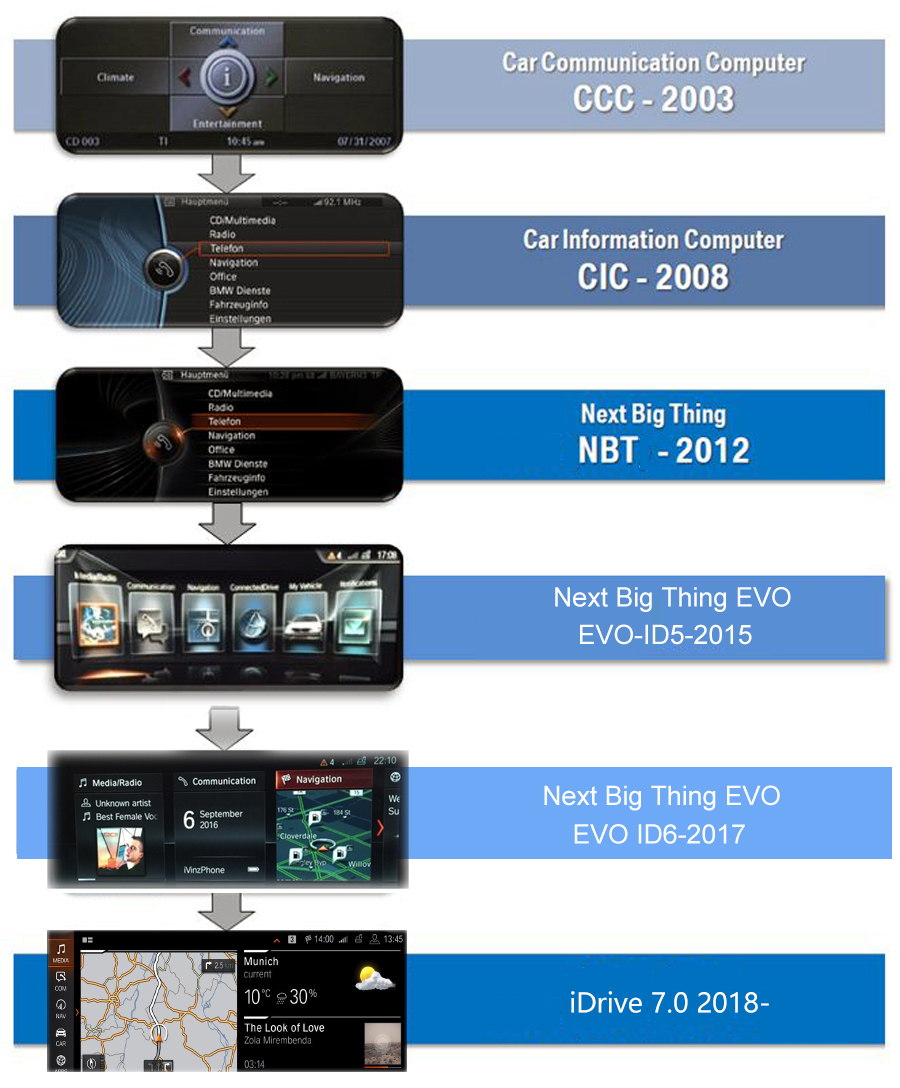
Order it through this link: BMW X5(F15)/X6(F16) 2013-2019 Aftermarket Radio Upgrade BMW aftermarket navigation head unit has a 10.25-inch touchscreen, it is specially designed to upgrade the stock radio system on BMW X5(F15) 2013-2018/X6(F16) 2015-2019, plug and play, no need to cut wires, free GPS navigation map preloaded for your country. It comes with CANBUS decoder, supports the original car information. Compatible Vehicles: BMW X5(F15) 2013, 2014, 2015, 2016, 2017, 2018BMW X6(F16) 2015 2016 2017 2018 2019 Note above year range is for your reference only. Send a photo of the dashboard(radio system) to us if you are unsure about fitness. Attention: 1. This product can replace the OEM 6.5-inch, 8.8-inch and 10.25-screen.2. This product fits both left-hand drive and right-hand drive.3. This product is only compatible with BMW X5(F15)/X6(F16) with NBT and EVO(non-touchscreen) systems. If the car has EVO system with touchscreen, then it is not compatible with the car. Please DO NOT buy. User manual: https://www.carnaviplayer.com/docs/user_manual/BMW/User_Manual.pdfInstallation instructions: https://www.carnaviplayer.com/docs/Installation_instructions/8235.pdfDIY installation video 1: https://youtu.be/moR3iJcB3Y0DIY installation video 2: https://youtu.be/zVhNIfJ-Sv4 How do I know what system it is on my BMW? Original radio system Display 10.25-inch resolutions 1920 by 720 Processor Qualcomm Snapdragon 8-core 2.0GHz Memory 4GB(6GB optional) Storage 64GB(128GB optional) SD/TF card One 3.0 card slot(Max 128GB) USB port USB ports(Max 64GB) Video play MP4, AVI, RMVB, FLV, MKV 4K, H.264(AVC),H.265(HEVC) etc. Video input One video input(RCA port)(optional) Camera input One camera video input(RCA port) Microphone Internal & External Microphone(optional) Bluetooth Bluetooth 5.0 module Network Wi-Fi/3G(4G) Ltd Audio IC RK616(Built-in Core module) GPS receiver External GPS antenna(include) Navigation * Free maps preload and free updates * Stunning 3D visualization * Text-to-speech direction * Support Google maps, Waze, Sygic, etc. Network * Wi-Fi/3G(4G) Ltd Radio * Remains original BMW AM/FM/Sirius/XM tuner Apple CarPlay(optional) * Support Apple Carplay with iPhone Bluetooth * Hands-free phone call * Load the phone book from your mobile phone * Bluetooth music stream A2DP * Internal & External Microphone(optional) * Compatible with iPhone & Android mobile phones Android Auto(optional) * Support Android Auto with Android phones * Wired connection, not wireless * Charge phone while playing Backup Camera (Camera is optional) * Display reverse image automatically once put in the reverse *Sony CCD camera with night vision SD/USB * SD card/USB music, video, photo, and ebook * Charge phone through USB port TV(TV tuner is optional) * Support ATSC/DVB-T/DVB-T2/ISDB-T DVR(Camera is optional) * support forward video recorder while driving * Operate via touchscreen * USB port, Plug & Play Frequently asked questions: Is this product plug-and-play? Do I need to program or code my BMW? Do I need to buy an external GPS antenna? Can I still check the car info as the OEM screen?Answer: Yes, it is totally plug-and-play, it has the same plugs and harness as the original BMW system. You do not need to program your car when installation, totally plug and play. All necessary accessories are included in the package. You do not need to buy anything else to make it work. You can still check the original BMW car info as before. How do I switch the new Android system to the original BMW NBT/EVO interface?Answer: Please tap the “Car-infoâ€?icon on the home screen OR long press (3 seconds) MENU button on iDrive to switch to the original NBT/EVO interface. How do I switch the original BMW NBT/EVO interface to the new Android system?Answer: Please tap the screen or long press (3 seconds) MENU button on iDrive. Why does it show “No signalâ€?when tapping “Car-infoâ€?or switching back to the original BMW interface?Answer: Please check the LVDS port. Make sure you connect the LVDS plug (removed from the OEM screen) to the new screen. Different systems have different LVDS plugs. Why is there no audio from the new Android system?Answer: A. Please check the AUX-IN cord. Make sure it is plugged into the AUX-IN port on your car. B. And also, you need to activate the AUX-IN function. CD/Entertainment/External devices/External audio input (AUX front)/activate. Why does the Sirius/XM radio, original car computer info and factory camera not display? Why does the AUX-IN volume stuck on zero and not adjustable?Answer: Please check the fiber optics plug, you need to move it from the original connector to the new connector we provided. My car has factory backup camera, why does it not display when I reverse the car?Answer: Please check the Settings/system setting/Rear camera type. Make sure the "Original camera" option is activated.
Save on BMW X5(F15)/X6(F16) 2013-2019 Aftermarket Radio Upgrade with a Radio-Upgrade discount code
Checkmate is a savings app with over one million users that have saved $$$ on brands like Radio-Upgrade.
The Checkmate extension automatically applies Radio-Upgrade discount codes, Radio-Upgrade coupons and more to give you discounts on products like BMW X5(F15)/X6(F16) 2013-2019 Aftermarket Radio Upgrade.
Top Radio-Upgrade discount codes
Save an Extra 10% on Exclusive Selection
Last used about 2 years ago
Community-sourced coupon
Last used about 2 years ago
Up to 30% off selected products
Last used about 2 years ago
See all codes

Similar items

